Coupon 🚀 Code:- Lifetime50
Enjoy a mind-blowing 50% OFF on LIFETIME Memberships with WPcrates! Don’t miss this once-in-a-lifetime deal – unlock unlimited premium WordPress themes and plugins today! 🚀
Coupon 🚀 Code:- Lifetime50
Coupon 🚀 Code:- Lifetime50
Enjoy a mind-blowing 50% OFF on LIFETIME Memberships with WPcrates! Don’t miss this once-in-a-lifetime deal – unlock unlimited premium WordPress themes and plugins today! 🚀
Coupon 🚀 Code:- Lifetime50
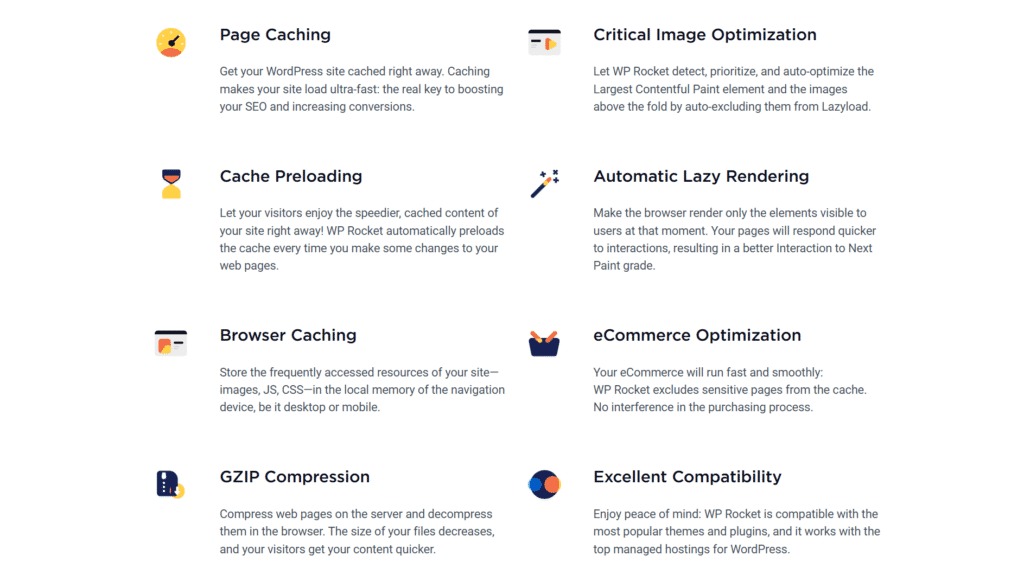
WP Rocket is a paid WordPress caching and performance optimization plugin first released in 2013. Unlike most free cache plugins, which have dozens of settings and you need technical knowledge to configure, WProcket is designed for simplicity. The second you install and activate it, the plugin uses 80% of the web performance best practices and automatically applies them including page caching, browser caching, and GZIP compression.
This “plug and play” mentality is what makes WP Rocket the #1 choice for so many in 2025. Website owners won’t need to spend hour on configuring technical settings or worse; breaking your site. Rather, WP Rocket makes it easy to get quick wins.
Google PageSpeed Insight’s score – Core Web Vitals being a crucial ranking factor now.
Conversions and sales – research the way that even a one second delay in page load time can lead to a 2% drop off.
With over 5 million websites all over the world using and recommending WP Rocket, being recommended by WordPress experts, by Divi theme, Astra Pro developers and many others – it’s developed itself to be top-tier in terms of ensuring the performance speed of your website, increasing SEO rank points and improving user experience.
Who Should Use WP Rocket in 2025?
Best of all, WP Rocket is suitable for every kind of WordPress user as it’s incredibly easy to use whether you’re a total beginner or a seasoned pro. But let’s take a look at who benefits the most in 2025.
1. Bloggers & Content Creators
If you run a WordPress blog, poor site speed can seriously damage engagement and SEO. Get Started WP Rocket This WordPress plugin will instantly load your posts and decrease bounce rates by keeping people on-page all helping your SEO growth.
2. Freelancers & Agencies
Agencies who build sites for clients save time with WP Rocket because this plugin takes care of caching, minification and optimization out-of-the-box. Which means less troubleshooting and more happy clients.
3. eCommerce & WooCommerce Stores
With 57% of users leaving carts if checkout takes more than 3 seconds, speed is crucial in eCommerce. Optimizing for WooCommerce WP Rocket actually includes WooCommerce specific optimizations which ensure that cart and checkout pages are not cached, but everything else is (including products).
4. Business Owners & SEO Professionals
Faster websites equate to higher Google rankings, better Core Web Vitals and an increase in conversions. WP Rocket offers small businesses the performance benefits that big brands spend a huge amount in.
5. WordPress Beginners
Free cache plugins such as W3 Total Cache tend to confuse beginners with over 20 setting tabs. WP Rocket lets you make all these tweaks without needing to learn how to code, but there are also a ton of advanced modification options for developers.
Key Features of WP Rocket
Page Caching and Browser Caching
Caching is the soul of WP Rocket. When someone arrives at your WordPress page, WP Rocket immediately receives a copy of all of the contents on this page and then saves automatically. This means instead of generating HTML content on the fly with PHP and queries each time, your server can serve up that pre-built entity immediately.
Page Caching: Optimizes the first view of your website by caching a simplified version of every page.
Browser Caching: It stores static files such as images, CSS and JavaScript on the visitor’s browser. On subsequent visits, the browser retrieves these from a local cache instead of requesting them anew from your server.
The result? Less server load, quicker page delivery time and improved Core Web Vitals for desktops as well as mobile!
GZIP Compression and File Minification
WP Rocket automatically enables GZIP compression, which compresses files before they are sent from your server to the user’s browser.File sizes are reduced dramatically (mostly for CSS and JavaScript).
In addition, WP Rocket provides:
Minification: Removes spaces, line breaks, and unnecessary characters from code.
Concatenation: Combines multiple CSS or JavaScript files into fewer requests.
These techniques result in smaller files, fewer HTTP requests, and faster page loads which translate into higher PageSpeed scores as well as a better user experience.
Lazy Loading and Media Optimization
Images and video typically make up 50%+ of a web page’s size. WP Rocket resolves this issue thanks to LazyLoad technology: images are only fetched when the visitor opens it.
Images: Lazy loading prevents all images from loading at once, improving initial render speed.
Videos and iframes: YouTube videos can be replaced with lightweight preview thumbnails, loading the full video player only when clicked.
CSS background images: Supported since version 3.15, further reducing requests and improving Largest Contentful Paint (LCP).
This single feature can result in massive load time reductions, and will be particularly noticeable if you have a blog or eCommerce site with a lot of images.
Database Optimization Tools
Your WordPress database becomes cluttered over time, with post revisions, spam comments and transients. These slow down your site. WP Rocket provides a built-in database clean up tool which:
Deletes your old post revisions as well as drafts.
Deletes spam and trashed comments.
Clears expired transients.
Autoschedules to optimizes the database tables.
This prevents database bloat and helps keep your WordPress lean while remaining responsive.
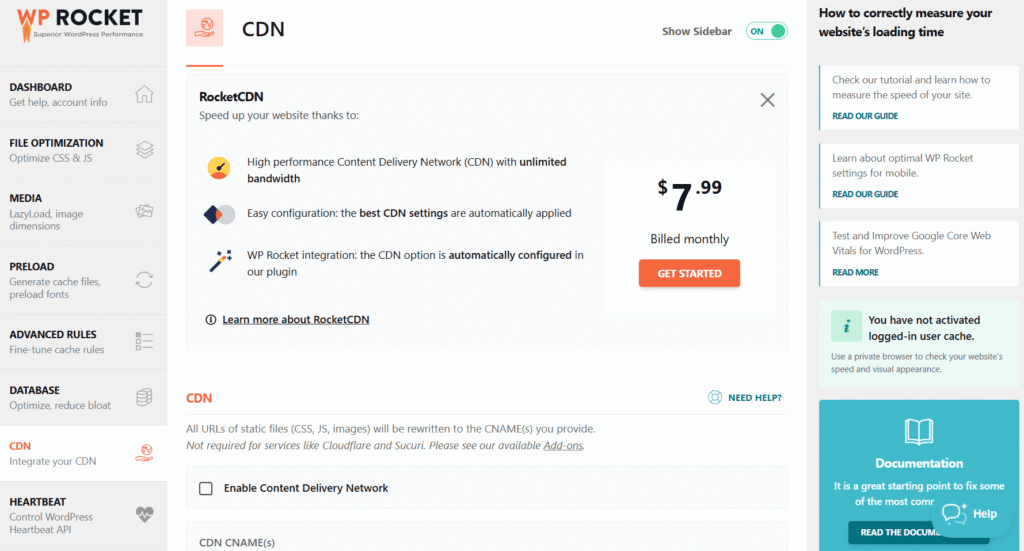
CDN Integration and RocketCDN
When enabled, your static files load from the nearest server location for the faster response time. CDN integration is a breeze with WP Rocket:
Compatible with all CDN providers (Cloudflare, Bunny, KeyCDN etc.).
Comes with its own add-on – RocketCDN (powered by BunnyCDN) starting from only $7.99/month.
Automatically rewrites your URLs to deliver images, CSS, and JS files from CDN servers.
This means faster worldwide performance, with your site loading quickly for visitors in the US, Europe, Asia and beyond.
WP Rocket Performance Test Results
Before and After Speed Comparisons
Offering immediate speed improvements without needing expertise in tweaking settings is one of the major strengths of WP Rocket. WP Rocket is consistently 30-50% faster in independent testing + it’s shockingly easy to use.
Before WP Rocket:
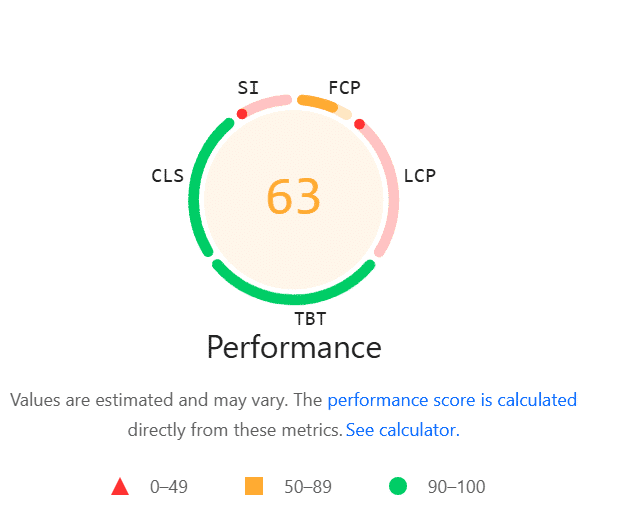
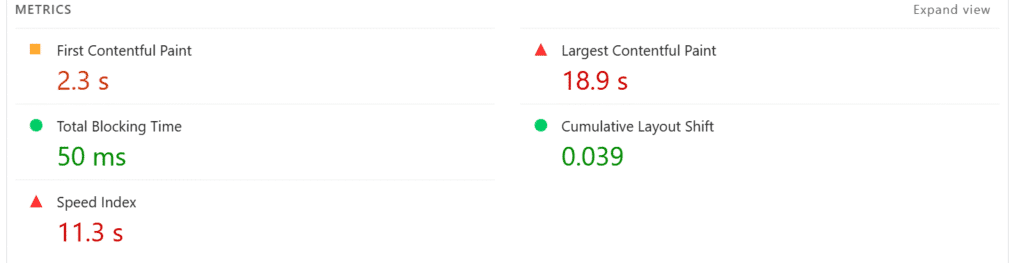
Performance score: 63/100 (orange zone).
First Contentful Paint (FCP): 2.3s.
Largest Contentful Paint (LCP): 18.9s (extremely slow).
Speed Index: 11.3s.
Total Blocking Time (TBT): 50ms.
Cumulative Layout Shift (CLS): 0.039.
After WP Rocket:
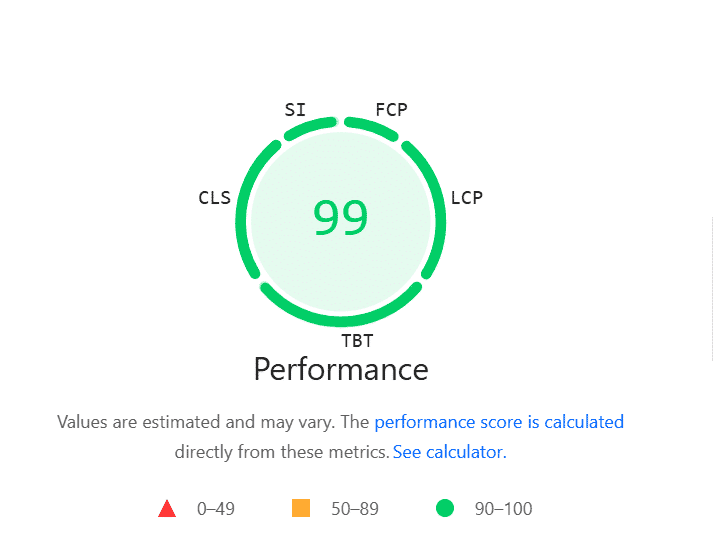
Performance score: 99/100 (green zone).
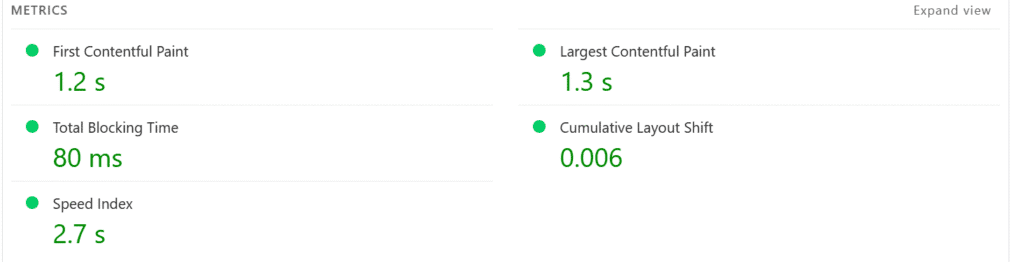
First Contentful Paint (FCP): 1.2s.
Largest Contentful Paint (LCP): 1.3s.
Speed Index: 2.7s.
Total Blocking Time (TBT): 80ms.
Cumulative Layout Shift (CLS): 0.006.
These results show that WP Rocket cut LCP from 18.9s down to 1.3s, slashed the Speed Index from 11.3s to 2.7s, and boosted the performance score to near perfection. That’s not a small improvement it’s a complete transformation.
In short: Within minutes, WP Rocket was able to do what I would need hours of manual optimization and free plugins to do.
Core Web Vitals Improvements with WP Rocket
Google’s Core Web Vitals (CWV) — LCP, FID/TBT, and CLS are now critical for SEO in 2025. It directly optimizes these metrics with caching, lazy loading, file minification, and JavaScript delay.
Here’s how your test data reflects these improvements:
Largest Contentful Paint (LCP): Improved dramatically from 18.9s → 1.3s thanks to lazy loading, optimized font delivery, and caching.
First Contentful Paint (FCP): Reduced from 2.3s → 1.2s, so users see meaningful content almost instantly.
Total Blocking Time (TBT / proxy for FID): Stayed extremely low (50-80ms), meaning the site is responsive with minimal input delays.
Cumulative Layout Shift (CLS): Stabilized further from 0.039 → 0.006, preventing distracting layout jumps.
These CWV advancements are much more than mere technical victories not only do they facilitate better user experiences, higher engagement and improved SEO rankings. Google rewards websites that meet CWV and thanks to WP Rocket, your website easily steps into the “green zone” when it comes to all crucial metrics.
Why Should You Pay For A Premium Cache Plugin Like WP Rocket?
There are many free caching plugins available for WordPress (W3 Total Cache or LiteSpeed Cache), but what I like about WP Rocket is that you can get results straight away without having to mess around with complex settings. Cumbersome configuration, technical knowledge and add-ons are required with free plugins to get the same result WP Rocket provides ready to go.
When you buy WP Rocket, you’re not just buying caching you’re buying:
Time Savings: Achieve optimization on the fly with little or no tuning.
Performance gains: Demonstrated increases in Core Web Vitals and PageSpeed Insights scores.
Regular updates: WProcket stays up to date with the newest performance and SEO requirements introduced by Google.
Support and documentation: Direct assistance when it’s needed, with a comprehensive knowledge base.
The few bucks you will spend per site is peanuts compared to peace of mind and speed for serious site owners, agencies, and E-commerce.
Pros and Cons of WP Rocket
Like any plugin, WP Rocket has its strengths and weaknesses. Here’s a quick breakdown:
WP Rocket Pros✅
WP Rocket Cons❌
Super easy to set up beginner-friendly, no coding required.
Premium-only: no free version available.
Delivers instant performance boosts (no complex setup needed).
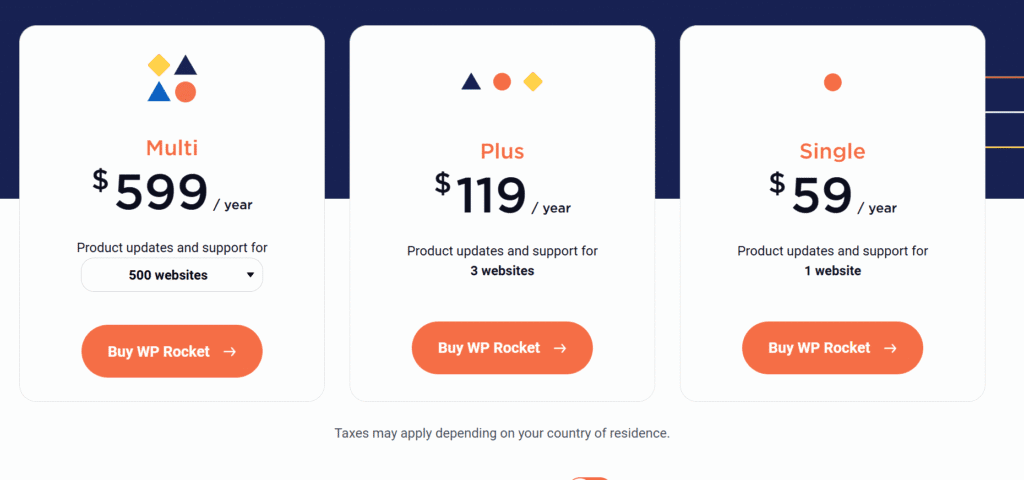
Slightly more expensive than some competitors (starting at ~$59/year).
Improves Core Web Vitals (LCP, CLS, FID) and SEO rankings.
Some advanced users prefer granular control with tools
Works seamlessly with most WordPress themes and plugins.
Limited built-in image optimization compared to dedicated plugins.
Built-in lazy loading, database cleanup, and CDN integration reduce extra plugins.
No free trial (but 14-day refund policy available).
Excellent customer support and regular updates.
✅ Choose WP Rocket If:
You run a business website, WooCommerce store, or blog where speed directly affects conversions and SEO.
You want a plug-and-play solution without digging into technical settings.
You’re a freelancer or agency managing client websites and need a reliable, scalable caching plugin.
You value support and frequent updates to stay compliant with Google’s speed and SEO requirements.
❌ Don’t Choose WP Rocket If:
You only need basic caching and don’t care much about Core Web Vitals or SEO rankings.
You’re building a hobby or small personal blog with no budget for premium plugins.
You prefer to manually configure caching and performance tweaks using free alternatives.
Advantages for Beginners & Non-Tech Users
One of the best things about WP Rocket is how little work you have to do to get it working. A lot of caching plugins are confusing for beginners, long list of toggles and settings, however WProcket is designed for non-tech users:
Its installation can simply take 3 min.
Most of the optimizations (caching, minifyng, lazy loading) are added by default.
The interface is clean easy to use and has an excellent documention.
Even if you don’t touch advanced settings, you’ll still see significant performance gains.
It’s the reason WProcket is perfect for bloggers, online business owners, or anyone consistently uploading content without a developer.
WPcrates also lists other premium cache plugins and tools with lifetime options.
WP Rocket Settings – Complete Overview
WP Rocket has a well-organized and simple dashboard split into many tabs. Here is a summary of the main settings:
Dashboard
License activation, quick access to documentation, and support.
Cache
Control caching for desktop and mobile. Includes separate cache for logged-in users and cache lifespan settings.
File Optimization
Minify and combine CSS/JS, remove unused CSS, defer/delay JS.
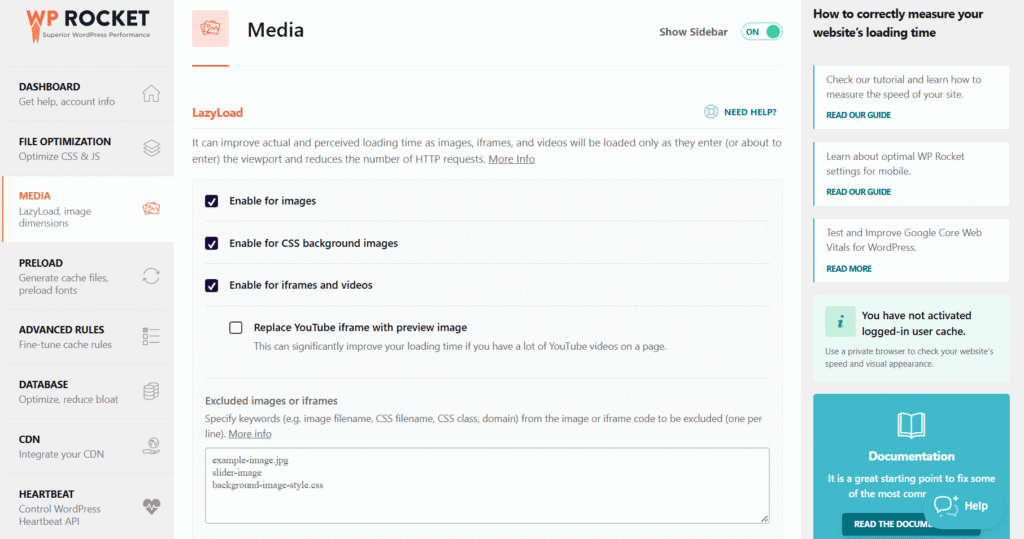
Media
Enable LazyLoad for images, iframes, and videos; add missing image dimensions.
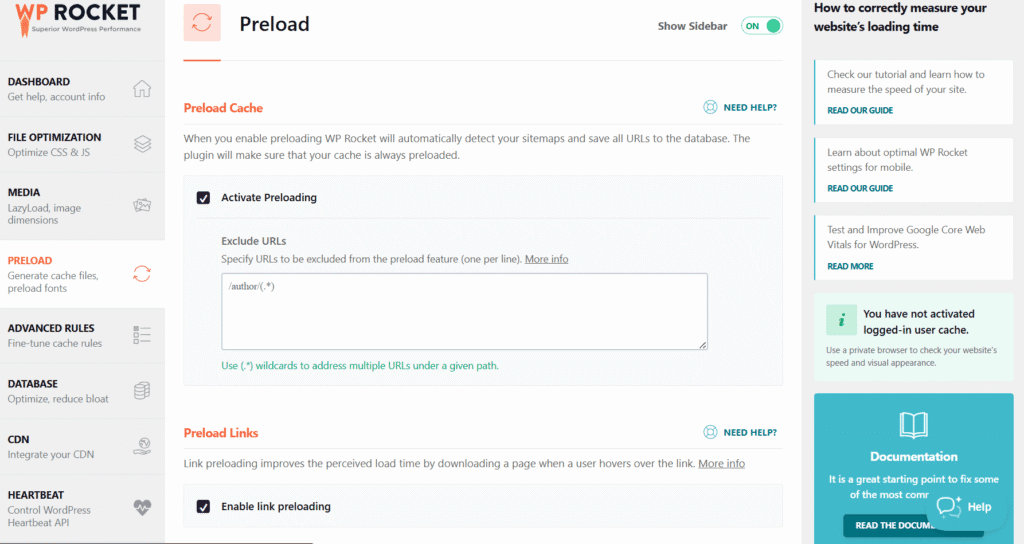
Preload
Automatically preloads cache and sitemaps for faster first visits.
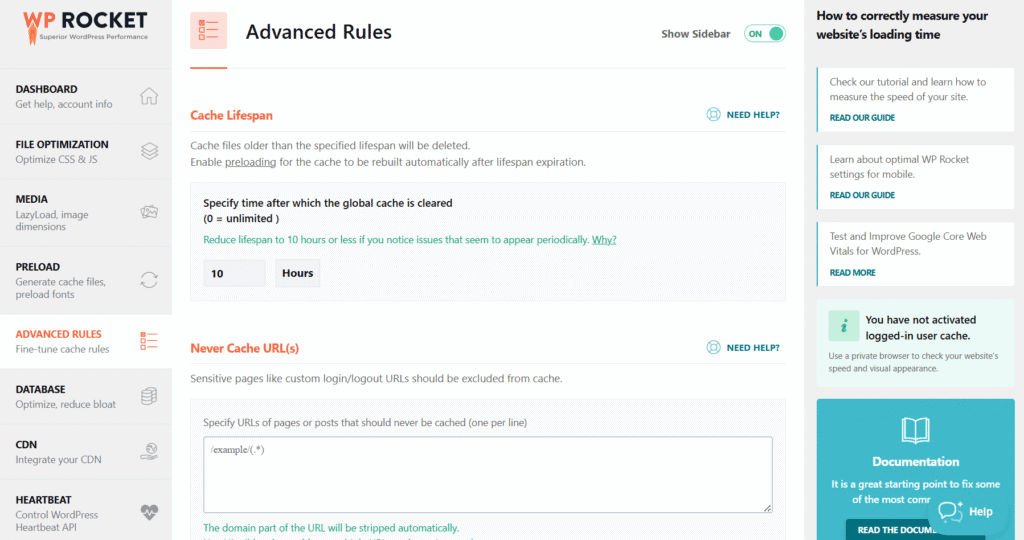
Advanced Rules
Exclude specific URLs, cookies, or user agents from caching.
Database
One-click cleanup of post revisions, drafts, and transients; also offers scheduling.
CDN
Integrate with any CDN, or use RocketCDN (their own paid add-on).
Step-by-Step Setup Guide for Beginners
Setting up WP Rocket takes less than 5 minutes:
Install & Activate – Upload the plugin, activate your license.
Enable Caching – Desktop and mobile cache are enabled by default.
File Optimization – Turn on CSS/JS minification and defer JS. Test to ensure compatibility.
LazyLoad – Enable for images and iframes (great for speeding up media-heavy sites).
Database Cleanup – Run a quick cleanup to remove revisions and expired transients.
Preload Cache – Start the preloading process so your site is always cached for visitors.
Integrate CDN – If you use Cloudflare, connect it in the Add-Ons tab; for RocketCDN, just enable with one click.
👉 For most beginners, WP Rocket works perfectly out of the box but advanced users can fine-tune each section for extra gains.
Recommended Settings for Best Results
Here are the settings most experts recommend enabling in 2025:
✅ Mobile Cache + “Separate cache for mobile devices”
✅ Minify + Combine CSS/JS (but test compatibility)
✅ Delay JavaScript Execution (biggest Core Web Vitals boost)
✅ Remove Unused CSS
✅ LazyLoad for images, iframes, and videos
✅ Preload Sitemap (automatically re-caches pages after updates)
✅ Schedule Database Cleanup (weekly recommended)
✅ Enable CDN (Cloudflare, RocketCDN, or any custom CDN)
These settings are the optimal mixture of speed and stability for most WordPress websites.
WP Rocket Support
One of the best benefits of WP Rocket over other free caching plugins is that it comes with great support. Rather than leaving the users on their own to figure things out, WProcket gives hands-on assistance from a qualified team that specializes in WordPress performance and compatibility.
Final Verdict: Who Should Buy wprocket?
✅ Buy WP Rocket if:
You run a content-heavy blog, eCommerce store, or business site where speed directly impacts conversions.
You prefer a simple, plug-and-play solution with advanced features included.
You want to boost Core Web Vitals and SEO rankings with minimal effort.
❌ Skip WP Rocket if:
You’re just starting out with a small personal blog and can’t justify the cost.
You’re a developer who prefers manually configuring caching and optimization settings.
👉 Final Words: As of 2025 WP Rocket is still one of the best wordpress caching plugins. It’s an investment, but if speed, SEO and a better user experience are your aim, it’s worth every penny.