Eventin Pro AI Powered Event Manager for WordPress
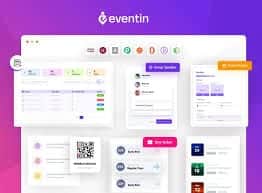
Eventin is an all-in-one events and ticketing platform for WordPress that lets you plan, publish, sell, and scale without custom code. From AI-assisted event creation and flexible schedules to native ticketing, RSVPs, QR check-ins, and deep integrations, Eventin Pro streamlines everything—whether you are running a single webinar or a multi-day conference. It is fast for organizers and intuitive for attendees.

Why choose Eventin for WordPress
Choosing an event stack is about speed, reliability, and revenue. Eventin Pro focuses on the daily jobs organizers perform and removes friction at each step.
- AI drafts titles, descriptions, tags, FAQs, schedules, and banners from a short prompt.
- Create unlimited events with recurring rules, speaker bios, and reusable templates.
- Sell tickets with tiered pricing, coupons, tax handling, and automatic confirmations.
- Collect RSVPs with custom forms, invite links, and role-based check-in permissions.
- Sync with Google Calendar, iCal, and Outlook so guests never miss a session.
- Host live sessions via Zoom or Google Meet with links sent after registration.
- Track bookings, revenue, and engagement in a clean analytics dashboard.
Everything you can build with Eventin Pro
- Single events with schedules, speakers, venue maps, and one-click “add to calendar”.
- Multi-day conferences with tracks, parallel sessions, and keynotes.
- Hybrid events that blend in-person and virtual using Zoom or Meet.
- Course series and training cohorts with recurring sessions and certificates.
- Private briefings or client-only sessions gated by user roles.
Ticketing and revenue made simple
Monetize events with an experience that feels native to WordPress.
- Multi-tier pricing such as Early Bird, Standard, VIP, and group bundles.
- WooCommerce for store-wide reporting plus Stripe and PayPal for direct checkout.
- Discount codes and timed promotions to drive urgency.
- Branded tickets and order emails delivered automatically after purchase.
- QR-based verification at the door with scan logs for audit trails.
AI features that save hours
- Generate a complete draft: agenda outline, copy blocks, and image prompts.
- Turn bullet points into timed schedules with speaker slots.
- Create event-specific FAQ sections to reduce support questions.
- Summarize long descriptions for social posts and email snippets.
- Save brand voice guidelines for consistent tone across events.
Scheduling, calendars, and reminders
- Daily, weekly, or monthly recurring rules with exceptions.
- All-calendar sync to Google Calendar, iCal, and Outlook.
- Timezone-aware displays that adapt to each viewer.
- Automated confirmations and reminder emails with your branding.
- Optional SMS reminders via supported integrations to reduce no-shows.
Design freedom with your favorite builders
Build beautiful event pages without code and match them precisely to your site.
- Native Gutenberg blocks for listings, calendars, and search.
- Elementor widgets for cards, grids, schedules, speakers, and filters.
- Compatibility with Divi and Bricks for visual editing workflows.
- Templates for single events, archives, and high-converting landing pages.
- If you are comparing ecosystems and searching for eventon elementor, Eventin’s Elementor widgets offer a similar visual building experience with deeper event options.
Integrations and automation
- Zoom and Google Meet for instant meeting link delivery.
- WooCommerce for orders, taxes, and store-wide reports.
- Zapier, Pabbly, SureTrigger, and webhooks to automate cross-app tasks.
- FluentCRM and other email tools for segmented campaigns.
- Twilio for SMS notifications and day-of messaging.
- BuddyBoss and membership plugins for member-only sessions and discussion.
Analytics and growth
- Dashboard views of sales, RSVPs, check-ins, and capacity.
- Search and conversion insights to improve landing pages and pricing.
- Coupon performance and channel attribution for smarter promotion.
- Export attendee data for post-event surveys and lookalike audiences.
Roles, access, and front end submissions
- Role-based permissions for organizers, check-in staff, and support agents.
- Front-end event submission for partners or community hosts with approvals.
- Optional visual seat selection via compatible add-ons when assigned seating is needed.
- Certificates and badges with the included builder for professional recognition.
Who uses Eventin Pro
- Event producers who need to publish quickly, sell tickets, and scan attendees.
- Agencies running launches and webinars for multiple clients.
- Coaches and course creators scheduling cohorts and issuing certificates.
- Communities and meetups relying on recurring events with RSVPs and waitlists.
- Internal teams managing offsites, town halls, and private briefings.
Quick start checklist
- Install Eventin Pro and activate required components.
- Connect payments via WooCommerce, Stripe, or PayPal.
- Open the AI assistant and generate your first event draft.
- Add speakers, sessions, and ticket tiers with capacity limits.
- Enable calendar sync and choose Zoom or Google Meet for virtual sessions.
- Customize ticket and email templates with your branding.
- Add the event to a landing page using Gutenberg blocks or Elementor widgets.
- Publish, promote with coupons, and monitor sales in analytics.
- Scan QR codes at the door for check-ins and attendance logs.
- Send post-event follow-ups and certificates, then clone for the next run.
Secure files and long term reliability
Events are mission-critical. Avoid risky, modified packages circulating online. Nulled or altered downloads can contain malware, break updates, or expose attendee data. Use verified sources so payments, attendee details, and calendar links remain secure—and your pages stay fast.
Why buy from WPcrates
WPcrates specializes in GPL and original-license WordPress products at accessible prices. Get Eventin Pro along with thousands of complementary themes and plugins for performance, SEO, forms, security, and marketing. Files are clean and update-ready so your event site stays secure, fast, and compatible as WordPress evolves.
Final thoughts
Eventin Pro brings AI productivity, reliable ticketing, and flexible design into one plugin so you can launch events quickly and deliver a professional attendee experience. From multi-day conferences with speakers and tracks to weekly classes with certificates, you get the tools to plan, promote, sell, and analyze—without stitching together multiple systems. Pair Eventin with your preferred builder and marketing stack, automate reminders and check-ins, and focus on creating memorable events that grow your brand and revenue.




![<strong>[Lifetime Key] All-in-One WP Migration – Unlimited Extension</strong>](https://wpcrates.com/wp-content/uploads/2025/04/neve-33-300x300.png)
![<strong>[Lifetime Key] NotificationX Pro</strong>](https://wpcrates.com/wp-content/uploads/2025/04/embeddpress-2-300x300.png)
![<strong>[Lifetime Key] Templately</strong>](https://wpcrates.com/wp-content/uploads/2025/04/embeddpress-1-300x300.png)
![<strong>[Lifetime Key] EmbedPress Pro</strong>](https://wpcrates.com/wp-content/uploads/2025/04/neve-34-300x300.png)
![<strong>[Lifetime Key] Essential Blocks Pro</strong>](https://wpcrates.com/wp-content/uploads/2025/04/essb-300x300.png)
![<strong>[Lifetime Key] SchedulePress Pro</strong>](https://wpcrates.com/wp-content/uploads/2025/04/scedulepress-300x300.png)

Reviews
There are no reviews yet.