WooCommerce Checkout Fields And Fees
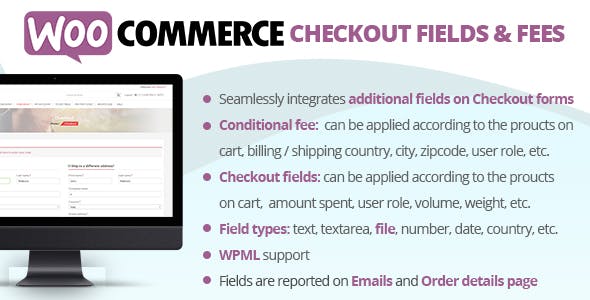
The WooCommerce Checkout Fields And Fees will allow you to easily apply fees (or discount in case the fee value is negative) and to display additional fields in the checkout Billing and Shipping forms! Both fees and additional fields can be applied/displayed according logic rules…and all done using a nice visual editor!
How WooCommerce Checkout Fields And Fees Works
The WooCommerce Checkout Fields And Fees plugin allows the shop admin to create fees (or discount if the fee value is negative) and additional checkout billing and shipping fields to which optionally he can associate some conditional rules. According to these conditional rules the plugin will decide if the additional fields have to be showed in Checkout forms and if the fees have to be applied to the Checkout cart.
Each field/fee can have multiple conditional rules related between them with and/or conditions. A conditional rule can consider several product/category/cart/user aspects data like the amount spent, height, weight, taxes, user roles…More info at Conditional logic paragraph!
WPML COMPABILITY
If WPML is detected, the WooCommerce Checkout Fields And Fees plugin will automatically show multilanguage input fields for labels, placeholders, etc. In this way, you can enter different texts for each language.
Product/Category conditions
Allows you to make the field visible according the followin options:
- Cart/Stock quantity
- Stock status
- Amount spent
- Amount spent excluding taxes
- Lenght
- Height
- Width
- Weight
- Volume
In case of multiple product selections, selected values can be considered for each item or as sum of items values. You can also optionally configure the rule in order to be satisfied if all the selected product are in cart or to apply just only to the product that actually are in cart.
And More!!!







![<strong>[Lifetime Key] All-in-One WP Migration – Unlimited Extension</strong>](https://wpcrates.com/wp-content/uploads/2025/04/neve-33-300x300.png)
![<strong>[Lifetime Key] NotificationX Pro</strong>](https://wpcrates.com/wp-content/uploads/2025/04/embeddpress-2-300x300.png)
![<strong>[Lifetime Key] Templately</strong>](https://wpcrates.com/wp-content/uploads/2025/04/embeddpress-1-300x300.png)
![<strong>[Lifetime Key] EmbedPress Pro</strong>](https://wpcrates.com/wp-content/uploads/2025/04/neve-34-300x300.png)
![<strong>[Lifetime Key] Essential Blocks Pro</strong>](https://wpcrates.com/wp-content/uploads/2025/04/essb-300x300.png)
![<strong>[Lifetime Key] SchedulePress Pro</strong>](https://wpcrates.com/wp-content/uploads/2025/04/scedulepress-300x300.png)

Reviews
There are no reviews yet.