WP 301 Redirects – Instantly Fix SEO Issues Redirections 404 Errors and Bad Links
WP 301 Redirects is a focused wordpress redirect plugin that fixes the issues most sites overlook: broken links, outdated URLs, and 404 errors. Clean redirects help search engines understand your structure and keep visitors on the content they intended to see. With the wp 301 redirects plugin you can correct legacy links, repair typos, and manage outgoing links in minutes while preserving page speed and rankings.
Why Do You Need WP 301 Redirects?
Search engines and users expect working links and a stable URL structure. Over time, site changes lead to 404 errors, old slugs, and external sites linking to pages that no longer exist. The wp 301 redirects wordpress plugin addresses each of these pain points so you can recover traffic and protect SEO.
- Fix 404 errors instantly when a visitor lands on a missing URL, send them to the best matching page instead of losing the session
- Handle URL changes after rebrands or permalink updates, forward old routes to new ones without manual .htaccess edits
- Improve affiliate and outgoing links create clean, trackable links and keep your catalog professional
- Detect bad links scan and verify outbound links so you are not pointing to unsafe or low quality domains
- No code control if you ever tried a wordpress redirect without plugin you know it is easy to break; this tool makes setup safe and fast
Key Features of WP 301 Redirects
- Instant 301 redirects repair broken and outdated URLs with true 301 status responses
- 404 monitoring see which missing pages visitors and bots are hitting and resolve them
- Smart rules real users are redirected to relevant content while bad bots receive a standard 404
- Outgoing link scanner audit external links and flag broken or risky destinations
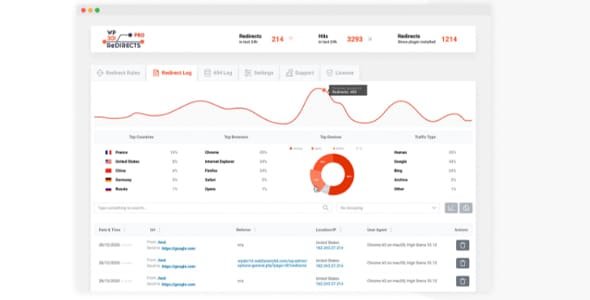
- Reports and charts understand redirect volume, sources, and popular targets without heavy analytics
- Custom outbound links create tidy, controlled links for partners and affiliates
- Rebranding and white label agencies can rename the interface and deliver branded PDF reports
- Centralized dashboard manage licenses, sites, logs, and brands in one place
- Lightweight performance no extra CSS or JS on the front end, minimal overhead on requests
- Broad compatibility works with any modern theme or plugin stack
Tip if you are migrating from another tool such as simple 301 redirects you can recreate rules and add link checks for a more complete workflow.
Benefits of Using WP 301 Redirects
- Recover lost traffic every fixed link rescues sessions that would have bounced on a 404
- Protect rankings consolidated link equity flows to the correct URLs which supports stable SEO
- Better user experience visitors land on useful content even if the link they used was outdated
- Save time and cost replace manual server edits and ad hoc fixes with a reliable interface
- Agency friendly white label options, branded reports, and multi site oversight fit client workflows
WP 301 Redirects vs Other Plugins
Many redirect tools are packed with features that slow down the front end or require complex configuration. wp 301 emphasizes speed and clarity. It does not inject assets into pages, it logs what matters, and it adds an outbound link scanner that basic redirect tools often lack. If you have considered a wordpress redirect plugin in the past but avoided overhead, this focused approach is designed for performance.
Who Should Use WP 301 Redirects?
- Bloggers who update titles and slugs and want to keep authority consolidated
- Stores that change product URLs and need to preserve organic and paid traffic
- Affiliate sites that rely on clean, trackable outbound links
- Agencies managing many client sites with branded reporting needs
- Teams standardizing redirects after rebrands or CMS migrations
WP 301 Redirects Pricing
Licensing is offered for single sites, small teams, and agencies. All tiers include core features, logging, and centralized management. Team and agency options add capacity for multiple domains along with white label and branded reports. The lifetime model removes recurring fees and simplifies budgeting.
Real Customer Feedback
Site owners report setup in under a minute, immediate recovery of traffic on previously missing routes, and clear visibility via logs and charts. Reviews frequently mention the lightweight footprint and the convenience of combining redirection with outbound link verification.
WP 301 Redirects and WPcrates
You can get wp 301 redirects and many other premium WordPress tools from WPcrates. WPcrates provides clean, safe downloads and affordable access to a large catalog of themes and plugins. In addition to this plugin, you can source performance, SEO, and design tools such as Elementor Pro, RankMath Pro, WP Rocket, Astra, GeneratePress, and more. Rather than risk unmaintained software, use WPcrates to keep your stack current and secure.
Final Thoughts – Is WP 301 Redirects Worth It?
WP 301 Redirects delivers a practical, fast way to manage redirects, fix 404s, and monitor outbound links. It safeguards rankings, preserves user sessions, and keeps your site structure clean as content evolves. If your goals include recovering traffic, improving SEO, and simplifying link management, this plugin fits neatly into a modern WordPress workflow and scales from single sites to agency portfolios.
How do I use a redirection plugin in WordPress?
Using a redirection plugin in WordPress is simple and doesn’t require coding skills. After installing and activating a plugin like WP 301 Redirects, go to your WordPress dashboard and open the plugin’s settings. From there, enter the old URL (the page that no longer exists) and the new URL (the page where visitors should be redirected). Save the rule, and the plugin will automatically forward visitors and search engines from the old page to the new one. This ensures you don’t lose traffic or SEO rankings when changing permalinks, updating content, or removing pages.









![<strong>[Lifetime Key] All-in-One WP Migration – Unlimited Extension</strong>](https://wpcrates.com/wp-content/uploads/2025/04/neve-33-300x300.png)
![<strong>[Lifetime Key] NotificationX Pro</strong>](https://wpcrates.com/wp-content/uploads/2025/04/embeddpress-2-300x300.png)
![<strong>[Lifetime Key] Templately</strong>](https://wpcrates.com/wp-content/uploads/2025/04/embeddpress-1-300x300.png)
![<strong>[Lifetime Key] EmbedPress Pro</strong>](https://wpcrates.com/wp-content/uploads/2025/04/neve-34-300x300.png)
![<strong>[Lifetime Key] Essential Blocks Pro</strong>](https://wpcrates.com/wp-content/uploads/2025/04/essb-300x300.png)
![<strong>[Lifetime Key] SchedulePress Pro</strong>](https://wpcrates.com/wp-content/uploads/2025/04/scedulepress-300x300.png)

Reviews
There are no reviews yet.