WP Sheet Editor Events Pro – Bulk Edit The Events Calendar Using a Spreadsheet
WP Sheet Editor Events Pro is a powerful bulk editor built specifically for The Events Calendar that lets you manage all your events inside a familiar spreadsheet interface. Instead of opening events one by one in WordPress, you can search, edit, and create events in bulk with changes applied live on your website without manual import/export.
If your site has hundreds (or thousands) of events, WP Sheet Editor Events Pro saves hours by turning event management into simple rows and columns. Update dates, venues, organizers, categories, tags, prices, descriptions, images, and custom fields all from one screen.
Bulk Edit Events in a Spreadsheet (No Import/Export Needed)
With WP Sheet Editor Events Pro, you can edit event data instantly from the spreadsheet and apply changes directly in wp-admin. This means:
- No CSV import/export required for daily changes
- All edits apply live to your WordPress site
- Only modified cells are saved, reducing server load
- Works smoothly even with very large event databases
Advanced Search & Filters for Events
WordPress event search is often limited, but WP Sheet Editor Events Pro includes advanced search tools so you can filter events using any field as a condition. For example, you can:
- Filter events by date, price, venue, organizer, category, tag, and status
- Find all events in a category like Music with price greater than $50
- Locate events connected to specific venues or organizers
- Find events excluding certain locations
- Identify events missing featured images
This makes it easy to locate exactly what you need, then bulk edit only those matched events.
Edit Thousands of Events at Once Using Formulas
WP Sheet Editor Events Pro includes a formula engine that helps you apply bulk updates fast. You can replace, move, append, or calculate values across large event sets, such as:
- Replace event currency across selected events
- Bulk replace words/phrases in event descriptions
- Move events from one category to another in seconds
- Add or change tags for all selected events
- Increase event prices by 20% or reduce prices by a fixed amount
From pricing adjustments to mass content updates, formulas allow quick edits without repetitive manual work.
Create Events in Bulk (Fast Data Entry)
Creating events one by one is slow. With WP Sheet Editor Events Pro, you can bulk create events using multiple methods:
- Enter event information directly into spreadsheet rows and columns
- Copy/paste event data from Excel into WordPress
- Copy/paste event tables from other websites
- Import events from Excel or Google Sheets via CSV when needed
- Use autofill to copy values into many events quickly
This is ideal for event-heavy websites, festivals, agencies, or venues that publish frequent schedules.
Edit All Event Fields + Custom Fields
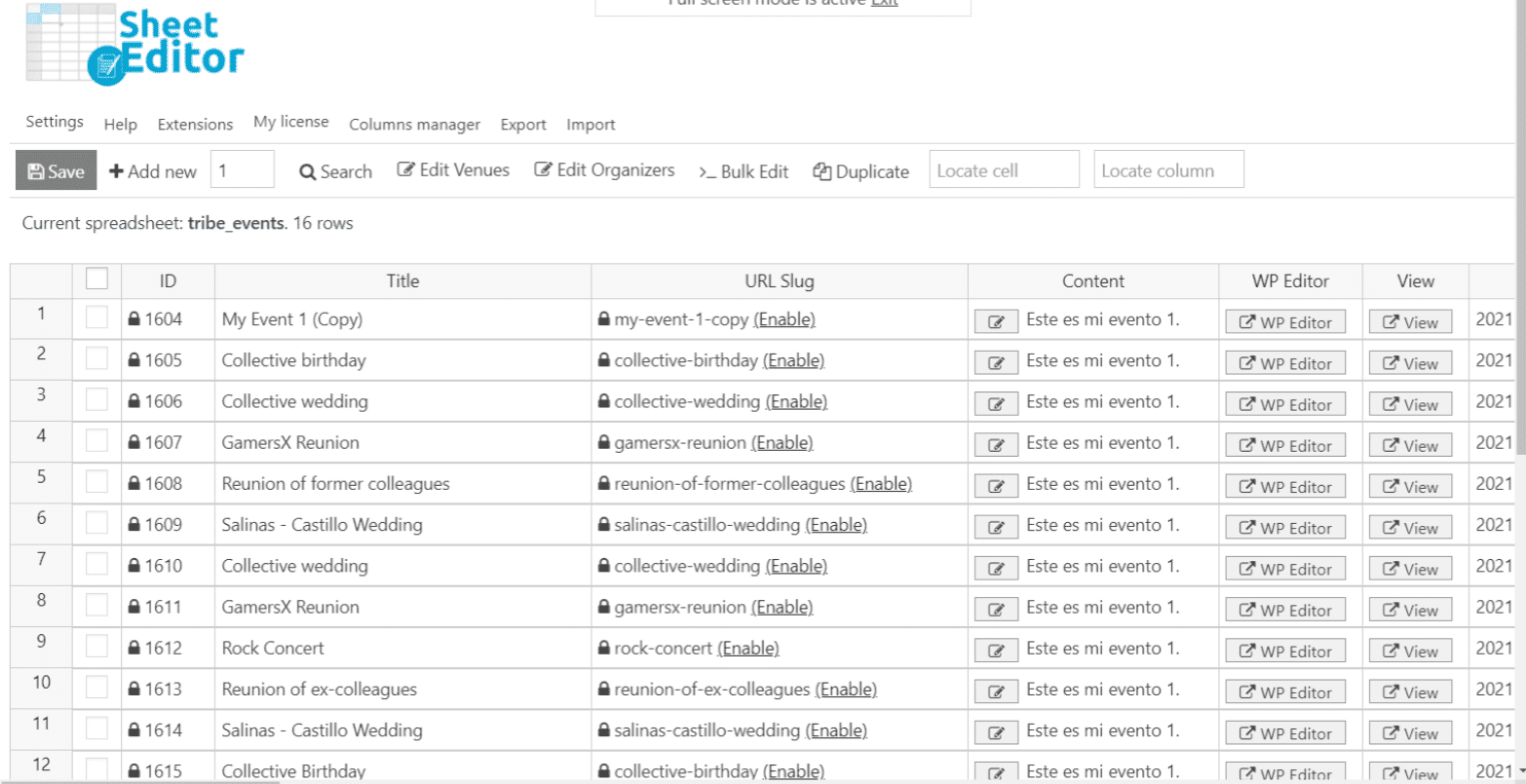
WP Sheet Editor Events Pro shows event fields as spreadsheet columns so you can view and manage everything on one page. You can update:
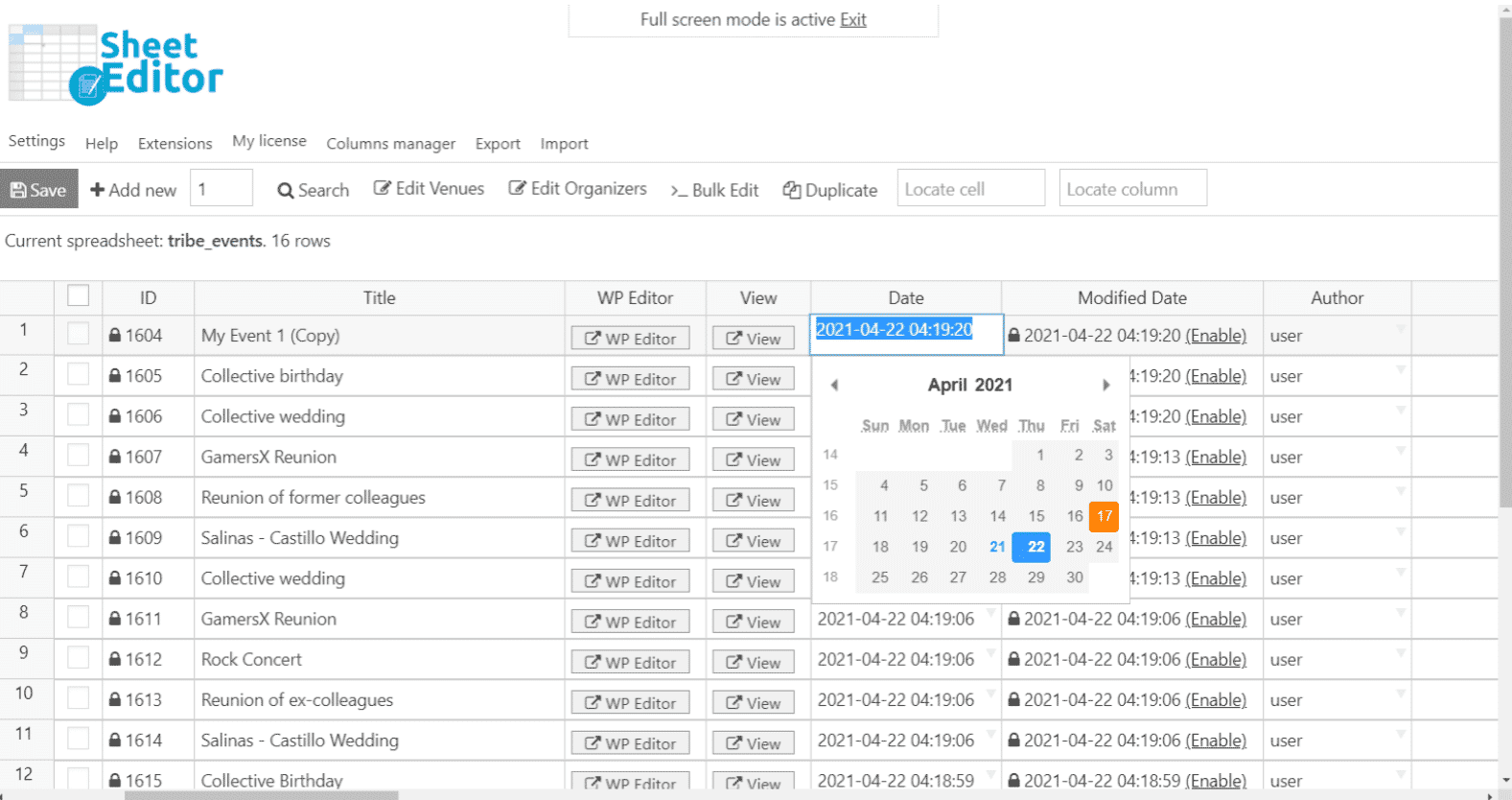
- Event titles, descriptions, dates, and time
- Event locations, venues, and organizers
- Event pricing, categories, and tags
- Featured images and event media (bulk image workflow supported)
- Custom fields added by other plugins
It also detects and displays Advanced Custom Fields (ACF) automatically, so you can edit ACF fields without extra configuration.
Venues & Organizers Included (3 Spreadsheets)
Event websites need more than event editing. WP Sheet Editor Events Pro includes three spreadsheets:
- Events spreadsheet
- Venues spreadsheet
- Organizers spreadsheet
You can use the same tools and bulk features across all three, making it easy to manage venues and organizers at scale.
General Features
- Complete information – Automatically loads all event fields as columns, including custom fields
- Custom columns – Add new columns to edit custom fields easily
- Column visibility – Hide, show, and reorder columns
- Resize & rename columns – Personalize the spreadsheet layout
- Event meta editing – Update custom fields across all events
- Advanced search – Filter by any field (venue, organizer, category, images, pricing, etc.)
- Template event (master event) – Create a base event and auto-fill new events with its values
Built for Large Websites (Efficient & Fast)
WP Sheet Editor Events Pro is designed to handle high-volume event websites while keeping server usage efficient:
- Loads only inside wp-admin (no impact on front-end site speed)
- Can load thousands of rows without performance issues
- Control how many rows save per batch (example: 3 rows every 20 seconds)
- Set wait time between batches (example: 3 rows every 60 seconds)
- Saves only modified cells (faster saves and less processing)
This makes it an excellent choice for large event calendars, directory sites, and high-traffic event businesses.
Who Should Use WP Sheet Editor Events Pro?
- Event organizers and venues with frequent schedules
- Festival and conference websites
- Agencies managing multiple event sites
- Communities and membership organizations
- Businesses running ongoing classes, sessions, or training events
Conclusion
If you manage a WordPress site with The Events Calendar and want to save time, reduce repetitive work, and gain full control through spreadsheet editing, WP Sheet Editor Events Pro is the perfect solution. From advanced event search to bulk edits using formulas, plus bulk event creation and full custom field support, it’s built to help you manage events faster and smarter.
Upgrade your workflow today with WP Sheet Editor Events Pro and edit events, venues, and organizers in bulk using a spreadsheet with changes applied live on your website.
Purchase WooCommerce Facebook Tab from WPcrates:
Get the WooCommerce Facebook Tab plugin from WPcrates for just $3. This affordable plugin provides powerful integration between your WooCommerce store and Facebook, helping you reach a broader audience and enhance customer engagement. With lifetime updates and dedicated support, it’s a valuable tool for any eCommerce business looking to leverage the power of social media.
Frequently Asked Questions (FAQs)
1) What is WP Sheet Editor Events Pro?
WP Sheet Editor Events Pro is a spreadsheet-based bulk editor for The Events Calendar that lets you search, edit, and create WordPress events in bulk from one screen, with changes applied live on your website.
2) Do I need to import/export CSV files to edit events?
No. Daily edits can be done directly inside the WordPress spreadsheet without import/export. If you want, you can still import events from Excel or Google Sheets using CSV, but it’s optional.
3) Can I bulk edit event prices, dates, categories, and organizers?
Yes. You can bulk edit virtually any event field including prices, dates, venues, organizers, categories, tags, descriptions, and more—using advanced tools and formulas.
4) Does it support custom fields and Advanced Custom Fields (ACF)?
Yes. Custom fields added by other plugins can appear automatically as spreadsheet columns, and ACF fields are supported so you can edit them without extra configuration.
5) Will this slow down my website?
No. The spreadsheet loads only inside wp-admin, so it doesn’t affect front-end performance. It’s also optimized for large websites and can save changes in batches while saving only modified cells.










![<strong>[Lifetime Key] All-in-One WP Migration – Unlimited Extension</strong>](https://wpcrates.com/wp-content/uploads/2025/04/neve-33-300x300.png)
![<strong>[Lifetime Key] NotificationX Pro</strong>](https://wpcrates.com/wp-content/uploads/2025/04/embeddpress-2-300x300.png)
![<strong>[Lifetime Key] Templately</strong>](https://wpcrates.com/wp-content/uploads/2025/04/embeddpress-1-300x300.png)
![<strong>[Lifetime Key] EmbedPress Pro</strong>](https://wpcrates.com/wp-content/uploads/2025/04/neve-34-300x300.png)
![<strong>[Lifetime Key] Essential Blocks Pro</strong>](https://wpcrates.com/wp-content/uploads/2025/04/essb-300x300.png)
![<strong>[Lifetime Key] SchedulePress Pro</strong>](https://wpcrates.com/wp-content/uploads/2025/04/scedulepress-300x300.png)

Reviews
There are no reviews yet.